> For the complete documentation index, see [llms.txt](https://docs.agenticflow.ai/llms.txt). Markdown versions of documentation pages are available by appending `.md` to page URLs; this page is available as [Markdown](https://docs.agenticflow.ai/welcome-to-agenticflow/ecosystem.md).
# Ecosystem: Platform · CLI · Ishi · AI Toolkit
How the AgenticFlow platform, CLI, Ishi, AI toolkit, and documentation fit together.
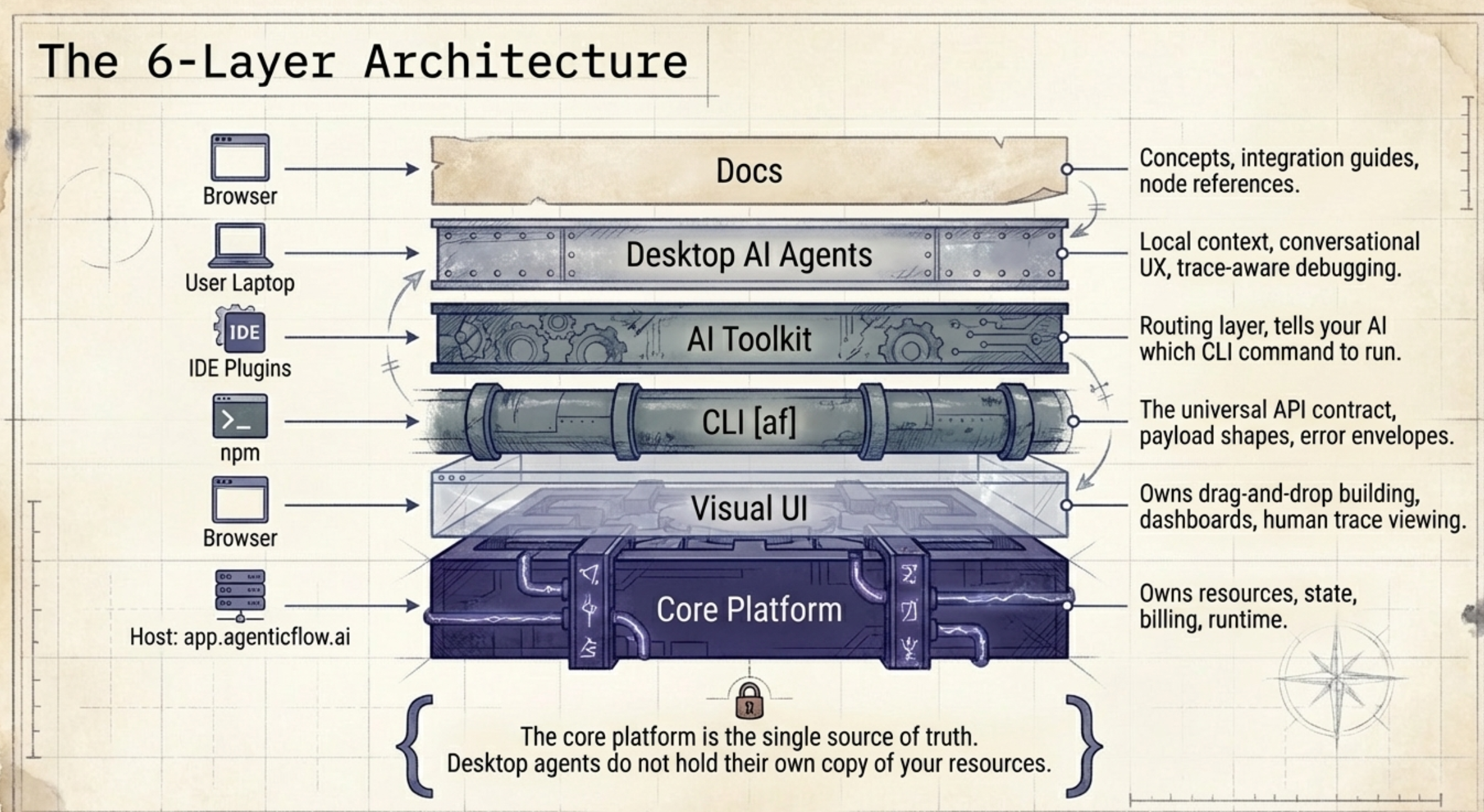
AgenticFlow is **one platform** surfaced through **multiple layers**. Each layer has a single responsibility. Together they let a human (or their AI agent) go from intent to a deployed, running agent in a single conversation.
{% embed url="" %}
## Why we built it this way
AgenticFlow's engine is powerful — multi-agent systems, MCP servers, code execution, native web search, agent task management, Anthropic-compatible skills, webhooks. But power without accessibility is a paradox: community feedback consistently pointed at configuration barriers, learning curves, and "2,000 pages of docs + 250 videos" failing to close the gap for non-technical users.
The fix is not more documentation. It is a different interface.
So we split the ecosystem into **two aligned parts**:
1. **The engine** — [app.agenticflow.ai](https://app.agenticflow.ai) keeps evolving as the production backend where agents, workforces, workflows, MCP clients, knowledge bases, and runs actually live. Product work prioritizes stability, traceability, versioning, and UX.
2. **The accessible interface layer** — a CLI (`af`) that exposes platform capabilities in a shape AI agents can drive, plus Ishi and AI-toolkit guidance for compatible developer tools.
This mirrors an industry-wide shift. [Shopify AI Toolkit](https://x.com/shopify/status/2042335627862032754) takes the same approach — expose the platform as an AI-readable contract, let the assistant do the configuration, let the human focus on intent. AgenticFlow's bet is the same: **you brief your AI, your AI talks to our CLI, the CLI configures AgenticFlow, and AgenticFlow serves your customers.**
## CLI-assisted operation
The CLI gives humans and AI coding tools the same operational contract:
* discover available platform capabilities
* validate payloads before creating resources
* create and update agents, workflows, and workforces
* inspect run state and hand back links to the Web UI
AgenticFlow remains the source of truth. The CLI and AI Toolkit are interfaces for configuring and operating the same platform resources.
## Ishi — first-party desktop AI agent
Ishi is AgenticFlow's first-party desktop AI agent. It uses the AgenticFlow CLI and API as its configuration backbone, so resources created through Ishi land in the same AgenticFlow workspace as resources created through the Web UI, API, or CLI.
Ishi is part of the AgenticFlow ecosystem, not a replacement for AgenticFlow. The product architecture remains: AgenticFlow owns the platform resources and runtime, while Ishi provides a conversational desktop interface for driving those resources.
## The six layers
| Layer | Lives at | Audience | Owns |
| -------------------- | ------------------------------------------------------------------------------------------- | -------------------- | --------------------------------------------------- |
| **Core platform** | [app.agenticflow.ai](https://app.agenticflow.ai) | Both (UI or API) | Resources, state, billing, auth, runtime |
| **Visual UI** | Same host, browser | Human | Drag-and-drop building, dashboards, trace viewer |
| **CLI** (`af`) | [`@pixelml/agenticflow-cli`](https://www.npmjs.com/package/@pixelml/agenticflow-cli) on npm | Developer + AI agent | Programmatic access, payload shapes, error envelope |
| **AI Toolkit** | Compatible AI coding tools | AI agent in IDE | Routing — tells your AI which CLI command to run |
| **Ishi + AI hosts** | User's chosen desktop or developer environment | Human + AI operator | Local context and command execution |
| **Docs** (this site) | Browser | Human | Concepts, integrations, node reference |
No layer duplicates another's data. Skills in the AI Toolkit point at `af bootstrap` for the live model list. Docs link to CLI help for command reference. CLI links back here for concepts. Ishi and other AI-assisted hosts use the CLI and the platform — they don't hold their own copy of your resources. **The core platform is the single source of truth.**
## Layer diagram
```
┌─────────────────────────────────────────────────┐
│ Core Platform │
│ app.agenticflow.ai │ Source of truth:
│ (UI + REST API + runtime) │ agents, workforces,
└─────────────────────┬───────────────────────────┘ MCP clients, runs,
│ trace log.
┌────────────────────────┼─────────────────────────┐
▼ ▼ ▼
┌─────────────────┐ ┌──────────────┐ ┌─────────────────┐
│ af CLI (npm) │ │ Visual UI │ │ Docs (this) │
│ payload shapes │ │ (browser) │ │ concepts, │
│ error envelope │ │ human-first │ │ node library │
└────────┬────────┘ └──────────────┘ └─────────────────┘
│
│ consumed by:
▼
┌───────────────────────────────────────────────────────────────────┐
│ Ishi + AI-assisted hosts │
│ │
│ ┌──────────┐ ┌──────────┐ ┌──────────┐ ┌────────────────────┐ │
│ │ Ishi │ │ Claude │ │ OpenAI │ │ Cursor / Gemini │ │
│ │ │ │ Code │ │ Codex │ │ CLI │ │
│ └──────────┘ └──────────┘ └──────────┘ └────────────────────┘ │
│ ▲ ▲ ▲ ▲ │
│ └─────────────┴─────────────┴─────────────────┘ │
│ each loads the AI Toolkit skill pack, which routes │
│ user intent to the right `af` CLI command │
└───────────────────────────────────────────────────────────────────┘
▲
│
Human user
(briefs intent in natural language)
```
The **CLI is the contract**. Whether the human is using Ishi, Claude Code, Cursor, Codex, Gemini CLI, or the AI Toolkit skill pack in another compatible host, the path to AgenticFlow is the same set of `af` commands with the same error envelope, the same `--dry-run` safety, and the same `af bootstrap` discovery.
## What each surface does
### Core Platform
The authoritative home for every resource. When you create an agent via the UI, the CLI, or the API, it lands in the same place. The `_links` block in `af bootstrap --json` returns URLs back into the UI so AI agents can hand off to their human at any point.
### Visual UI
The human path. Drag-and-drop workflow builder, agent 11-tab configuration, workforce graph canvas, connections management, knowledge library, dashboards. Best for design-first workflows, understanding the mental model, and reviewing what an AI agent built.
### `af` CLI
The **API contract for AI operators**. Every platform capability is exposed here with four amplifications that make it safe for autonomous use:
* **Local validation** — `--dry-run` on create/deploy commands catches shape errors before the network round-trip
* **Structured errors** — every failure returns `{schema: "agenticflow.error.v1", code, message, hint, details.payload}` with an actionable `hint` pointing at the next command
* **Partial updates** — `af agent update --patch` fetches → merges → PUTs, preserving attached MCP clients and tools
* **Self-description** — `af bootstrap/schema/context/playbook/changelog` returns everything an AI needs in one call
Developers use it directly for scripting. AI agents use it under the direction of the AI Toolkit.
### AI Toolkit
The **routing layer for AI agents** operating inside compatible developer tools and first-party desktop flows. Installed once via each host's plugin or skill mechanism when available. Three narrow flagship skills:
* **`agenticflow-workforce`** — multi-agent DAGs (coordinator → worker agents)
* **`agenticflow-agent`** — single-agent create/run/update
* **`agenticflow-mcp`** — attach external tool providers safely
Each skill has a tight `description` and `triggers[]` that routes user prompts. A `⚠️ When NOT to use` block on every skill points at its sibling to prevent over-engineering (e.g. don't spin up a workforce for a single-bot task).
The toolkit doesn't duplicate CLI knowledge — it tells the AI which CLI command to run and passes live output through.
### Ishi and AI-assisted hosts
The **human-facing operational layer**. Ishi or another compatible AI host can read the local context you allow it to access, take your natural-language intent, and drive the AgenticFlow CLI on your behalf — then report back with what it built.
Ishi is the first-party desktop AI agent in this layer. Claude Code, OpenAI Codex, Cursor, Gemini CLI, and similar hosts can load the AI Toolkit guidance and get the same CLI-driven integration. The CLI is the contract, so any compatible host can drive it.
Human, Ishi, and other AI-assisted paths converge at the same `af` commands with the same `bootstrap`/`schema`/`playbook` discovery surface.
### Docs (you are here)
The human-facing long-form library. Concepts, UI walkthroughs, integration tutorials, the 193+ node library in [Reference](/reference/nodes.md), industry use cases, enterprise guidance.
## Design principles
1. **CLI is the API contract for AI.** Anything an AI needs — auth, resources, schemas, shapes, changelog, playbooks, blueprints, marketplace — is in one of `af bootstrap/schema/context/playbook/changelog/blueprints/marketplace`. Ishi and compatible AI hosts consume the same surface.
2. **Toolkit routes, CLI answers.** Skills stay small (\~150 LOC) and point at CLI for live truth.
3. **Docs for humans, skills for AIs.** Overlap is a smell. If content drifts between them, delete one.
4. **Fail loud, hint clearly.** Every 4xx/5xx carries a recovery command in `hint`.
5. **One SoT per concern.** Concepts → docs. Commands → CLI. Routing → AI toolkit. Resources → platform. Local context → desktop agent.
6. **Local context stays explicit.** Anything running on the user's machine should use the local files and credentials the user intentionally provides.
7. **Stability first on the engine.** AgenticFlow platform stability, traceability, versioning, and UX remain the priority. Desktop-agent flows should use the same CLI and API surfaces as the rest of the platform.
## First-touch: human journey
A new user visits the platform:
1. **Sign up** at [app.agenticflow.ai](https://app.agenticflow.ai) → workspace + project auto-created.
2. **Generate an API key** at **Settings → API Keys**.
3. Decide on a path:
**Path A — Click to build.** Open the UI, follow [Quickstart](/get-started/01-quickstart.md). Best for understanding the product.
**Path B — Script with the CLI.** `npm install -g @pixelml/agenticflow-cli`, then:
```bash
af login # or set AGENTICFLOW_API_KEY / _WORKSPACE_ID / _PROJECT_ID
af doctor --json --strict
af bootstrap --json # always start here
```
See [CLI Reference](/developers/cli.md) for the full surface.
**Path C — Let your AI do it.** Use Ishi or load the AgenticFlow AI Toolkit into Claude Code / OpenAI Codex / Cursor / Gemini CLI or another compatible host. Describe what you want in natural language — the agent handles the CLI calls. No JSON, no payload shapes, no command memorization.
Then prompt your AI in plain language: *"Build me a customer support bot for my SaaS"*. The AI handles the CLI workflow below.
4. Each path converges on the same workspace — switch freely between UI, CLI, and AI-driven work.
**Target time-to-value:** under five minutes from signup to a deployed, runnable agent.
## First-touch: AI-agent journey (under the hood)
When a user in an IDE prompts their AI to build something on AgenticFlow, the AI Toolkit plugin activates. The journey the CLI is designed to support:
```
1. Orient: af bootstrap --json
↳ returns auth, agents, workforces, blueprints, playbooks, whats_new, _links
↳ check data_fresh — false means backend unreachable, don't mutate
2. Learn: af playbook --json
↳ e.g. `first-touch`, `migrate-from-paperclip`, `mcp-client-quirks`
3. Shape: af schema [--field ] --json
↳ payload shape for what you're about to create
↳ --field drills into nested shapes (mcp_clients, response_format, etc.)
4. Preview: af create --body @file --dry-run --json
↳ local validation catches shape errors before network
5. Build: af create --body @file --json
↳ single agent
OR: af workforce init --blueprint --name "" --json
↳ multi-agent team (auto-creates agents + wires the DAG)
6. Test: af agent run --agent-id --message "..." --json
OR: af workforce run --workforce-id --trigger-data '{...}'
7. Iterate: af agent update --agent-id --patch --body '{"field":"new"}' --json
↳ preserves MCP clients, tools, code-execution config
8. Ship: af workforce publish --workforce-id --json
↳ mints a public_key + public_url for the user's teammates
9. Cleanup: af delete ---id --json
↳ returns {schema:"agenticflow.delete.v1", deleted:true, id, resource}
```
At every step, a 4xx or 5xx response includes a `hint` that names the recovery command — no guessing.
### The composition ladder
AgenticFlow's three deploy verbs (`workflow`, `agent`, `workforce`) are rungs on a complexity ladder. **Start at the lowest rung that solves the user's problem.** Every rung composes from the rungs below.
```
Rung 6: WORKFORCE (DAG) Explicit multi-agent coordination
─ trigger → coord → [A || B] → synthesizer → output
─ References: nodes · workflows · agents · sub-DAGs
Rung 5: AGENT + SUB-AGENTS Lite multi-agent, agent-driven
─ triage.sub_agents = [specialist_a, specialist_b]
Rung 4: AGENT + WORKFLOW TOOL Flexible control + deterministic body
─ agent.tools = [{workflow_template_id: "deep_research"}]
Rung 3: AGENT + NODE PLUGINS Single flexible agent picks tools dynamically
─ agent.plugins = [web_search, web_retrieval, api_call]
Rung 2: WORKFLOW ENRICHED Deterministic + real-world data
─ trigger → web_retrieval → llm_summarize → output
Rung 1: WORKFLOW CHAINED Deterministic sequential reasoning
─ trigger → llm_plan → llm_execute → llm_format → output
Rung 0: WORKFLOW MINIMAL "Hello world"
─ trigger → llm → output
```
**Deploy verb maps 1:1 to kind:**
| Kind | CLI | Rungs covered |
| ----------- | ------------------------------------ | --------------------- |
| `workflow` | `af workflow init --blueprint ` | 0, 1, 2 |
| `agent` | `af agent init --blueprint ` | 3 (+ 4, 5 on roadmap) |
| `workforce` | `af workforce init --blueprint ` | 6 |
`af blueprints list [--kind ] [--complexity ] --json` surfaces every shipped blueprint with its rung so AI operators can filter.
### Choosing: agent vs. workforce vs. workflow
The AI Toolkit skills resolve this automatically from the user's prompt, but the underlying rule is simple:
| User intent | Choose | Why |
| -------------------------------------------------------------------------------------- | ------------------------------------------------ | ------------------------------------------------------------------------ |
| Deterministic multi-step pipeline (summarize URL, fetch API, chain LLMs) | **`af workflow`** | Rungs 0-2. Reproducible; no agent needed |
| A single chat endpoint, a customer-facing bot, one assistant | **`af agent`** | Rung 3. One prompt handles routing. Iterate with `--patch` |
| Multiple agents that hand off (research → write, triage → specialist, pre-built teams) | **`af workforce`** | Rung 6. One command creates the workforce, all agents, and the wired DAG |
| Attach Google Docs/Sheets/Slack/Notion/etc. to an existing agent | **`af mcp-clients` + `af agent update --patch`** | Inspect before attach to avoid tool-schema quirks |
Don't reach for a workforce when one agent suffices. Don't reach for an agent when a workflow suffices.
### Starter catalogs: blueprints (offline) and marketplace (live)
Two complementary ways to start from a template:
| | **Blueprint** (ships with CLI) | **Marketplace** (live backend) |
| --------- | ------------------------------------------------------------------------------------------ | ------------------------------------------------------- |
| Discovery | `af blueprints list --json` | `af marketplace list --type --json` |
| Storage | Version-locked to the CLI release | Hosted, curated, user-contributable |
| Network | None needed to list | Backend call per list/get/clone |
| Types | `workflow` · `agent` · `workforce` kinds (rungs 0-6 of the ladder) | `agent_template` · `workflow_template` · `mas_template` |
| Deploy | `af init --blueprint ` — the CLI picks the right verb from the blueprint's kind | `af marketplace try --id ` (auto-detects type) |
**Workflow blueprints (rungs 0-2, 362 total in CLI v1.10.7)** — deterministic multi-node flows. Need one LLM-provider connection in the workspace (auto-discovered). The table below shows core examples; run `af blueprints list --kind workflow --json` for the full catalog.
| ID | Rung | Nodes | Best for |
| --------------- | ---- | ------------------------ | --------------------------------- |
| `llm-hello` | 0 | llm | Learning the model; one-off Q\&A |
| `llm-chain` | 1 | llm\_plan → llm\_execute | Plan-then-execute reasoning |
| `summarize-url` | 2 | web\_retrieval → llm | Digesting an article URL |
| `n8n-converter` | 2 | LLM conversion chain | Converting n8n workflow JSON |
| `api-summary` | 2 | api\_call → llm | Explaining an unfamiliar JSON API |
**Agent blueprints (rung 3, 3 total)** — single agent with built-in plugins. No connection setup needed:
| ID | Plugins | Best for |
| -------------------- | --------------------------------------------------------- | -------------------------------------- |
| `research-assistant` | web\_search, web\_retrieval, api\_call, string\_to\_json | Current-events research with citations |
| `content-creator` | web\_search, web\_retrieval, agenticflow\_generate\_image | Blog drafts + hero images |
| `api-helper` | api\_call, string\_to\_json, web\_search | HTTP API wrappers with analysis |
**Workforce blueprints (rung 6, 14 total)** — multi-agent DAGs (trigger → coordinator → workers → output, optionally → synthesizer). Require the Workforce feature:
| ID | Agents | Shape |
| ------------------------------------------------------------------------------------ | ------ | ---------------------------------------------------------- |
| `research-pair` | 2 | planner → researcher (web\_search + web\_retrieval) |
| `content-duo` | 2 | writer (web) → illustrator (generate\_image) |
| `api-pipeline` | 2 | fetcher (api\_call) → analyst |
| `fact-check-loop` | 2 | writer → fact\_checker (verify claims via web\_search) |
| `parallel-research` | 4 | coordinator → 2 researchers (parallel) → synthesizer |
| `autonomous-desk` | 4 | planner → route gate → research/workflow → critic → editor |
| `dev-shop` · `marketing-agency` · `sales-team` · `content-studio` · `support-center` | 2-4 | Vertical teams (generic agents, attach your own tools) |
| `amazon-seller` · `tutor` · `freelancer` | 5 | Domain-specific vertical teams |
The first 6 workforce blueprints (`research-pair` through `autonomous-desk`) have AgenticFlow-native plugins or verified graph wiring pre-attached, so they work end-to-end with zero follow-up setup. `autonomous-desk` is the high-autonomy option for missions that need plan, execute, critique, revise, and edit loops.
**Roadmap:** Rungs 4 (agent + workflow tool) and 5 (agent + sub-agents) are supported by the backend but not yet exposed as CLI blueprints — planned in a follow-up release.
### Copy-paste prompts
Short, minimal-context prompts a user can paste to any AI assistant with `af` access, which then discovers + deploys via the CLI:
```
Set up a research agent that cites sources from the web. Use `af`, test with a real
current-events question, clean up after.
```
```
Deploy a parallel-research workforce via `af`, test with a "compare X vs Y" question.
Confirm both researchers ran in parallel and the synthesizer produced a unified answer.
Clean up after.
```
Full catalog: `af playbook ready-prompts`.
## How the surfaces stay in sync
Avoiding drift between four moving parts requires discipline:
* **CLI `playbooks.ts` is the source of truth** for playbook content. AI Toolkit skills regenerate from it (via a forthcoming `sync-from-cli.mjs` mechanism).
* **CLI `changelog.ts` is the source of truth** for version history. Surfaced via `af changelog --json` and consumed by docs + marketing.
* **`af bootstrap`-backed live data** (models, blueprints, workforces, agents) is queried at runtime — never hardcoded in docs or skills.
* **Platform is the SoT for resources.** Docs describe what a workforce IS; CLI is how you create one; platform is where it LIVES.
## Version alignment
* **Platform**: continuous — [app.agenticflow.ai](https://app.agenticflow.ai)
* **CLI**: [`@pixelml/agenticflow-cli@1.10.7`](https://www.npmjs.com/package/@pixelml/agenticflow-cli) (npm, tag-triggered auto-publish)
* **SDK**: [`@pixelml/agenticflow-sdk@1.6.0`](https://www.npmjs.com/package/@pixelml/agenticflow-sdk) (shipped alongside CLI)
* **AI Toolkit**: `v4.3.0` — distributed to Claude, Codex, Cursor, Gemini plugin marketplaces
* **Ishi**: desktop AI agent (first-party)
* **Docs**: this GitBook — continuously updated
When a new CLI version ships, `af changelog --json` surfaces the changes. The AI Toolkit's `scripts/sync-from-cli.mjs` will pull them into the skill content automatically (planned — manual sync in the interim).
## Next steps
* [Quickstart](/get-started/01-quickstart.md) — five-minute human onboarding
* [AgenticFlow CLI](/developers/cli.md) — developer-facing CLI overview
* [CLI Command Reference](/developers/agenticflow-cli-capabilities.md) — every command, every flag
* [API Overview](/developers/api.md) — REST contract below the CLI
* [Agents](/ai-agents/03-agents.md) — single-agent concepts
* [Workforce](/workforce/05-workforce.md) — multi-agent orchestration concepts
* [Integrations](/integrations/07-integrations.md) — MCP providers and 300+ tools
### Install the AI Toolkit
* **Claude Code**: install the AgenticFlow AI Toolkit from the host's plugin flow when available.
* **Gemini CLI**: install the AgenticFlow AI Toolkit from the host's extension flow when available.
* **Cursor**: Install from Cursor Marketplace
* **OpenAI Codex CLI**: `/plugins` → search AgenticFlow → Add to Codex
* **Other / VS Code**: use the host's plugin or project-instruction mechanism with the current AgenticFlow CLI guidance.